at_memberaudit – Administrator manual
Version 1.5.0 · Redmine 5.1 and 6 · GPLv2
This manual covers installation, configuration and daily use of the atori Member audit plugin.
1. Overview
The plugin adds a single admin-only page that presents a user × project matrix of role assignments. Cells show every role a user effectively holds in a project, including roles inherited via group memberships or via the parent-project chain when a sub-project is configured to inherit members.
Key concepts:
- Effective role – any role a user holds in a project, regardless of whether it was assigned directly, comes from a group the user belongs to, or is inherited from a parent project.
- Origin badge color – direct memberships (blue), group memberships (amber) and inherited memberships (violet) render with distinct colors; hover reveals the exact origin.
- Admin-only – the page is gated by Redmine's standard admin check; no extra roles or permissions are introduced.
2. Requirements
- Redmine 5.1.0 or newer
- Ruby 3.0 or newer
- No additional gems, no external services
3. Installation
cd /path/to/redmine
unzip at_memberaudit-1.5.0.zip -d plugins/
bundle exec rake redmine:plugins:migrate NAME=at_memberaudit RAILS_ENV=production
# restart Redmine
Verifying the install
After restart, log in as administrator. The plugin appears under Administration → Plugins with version 1.5.0, and a new admin menu entry Member audit (English) / Mitglieder-Übersicht (German) is visible at Administration.
Uninstall
cd /path/to/redmine
rm -rf plugins/at_memberaudit
# restart Redmine
The plugin owns no database tables, so no down-migration is required.
4. Usage
4.1 Opening the matrix
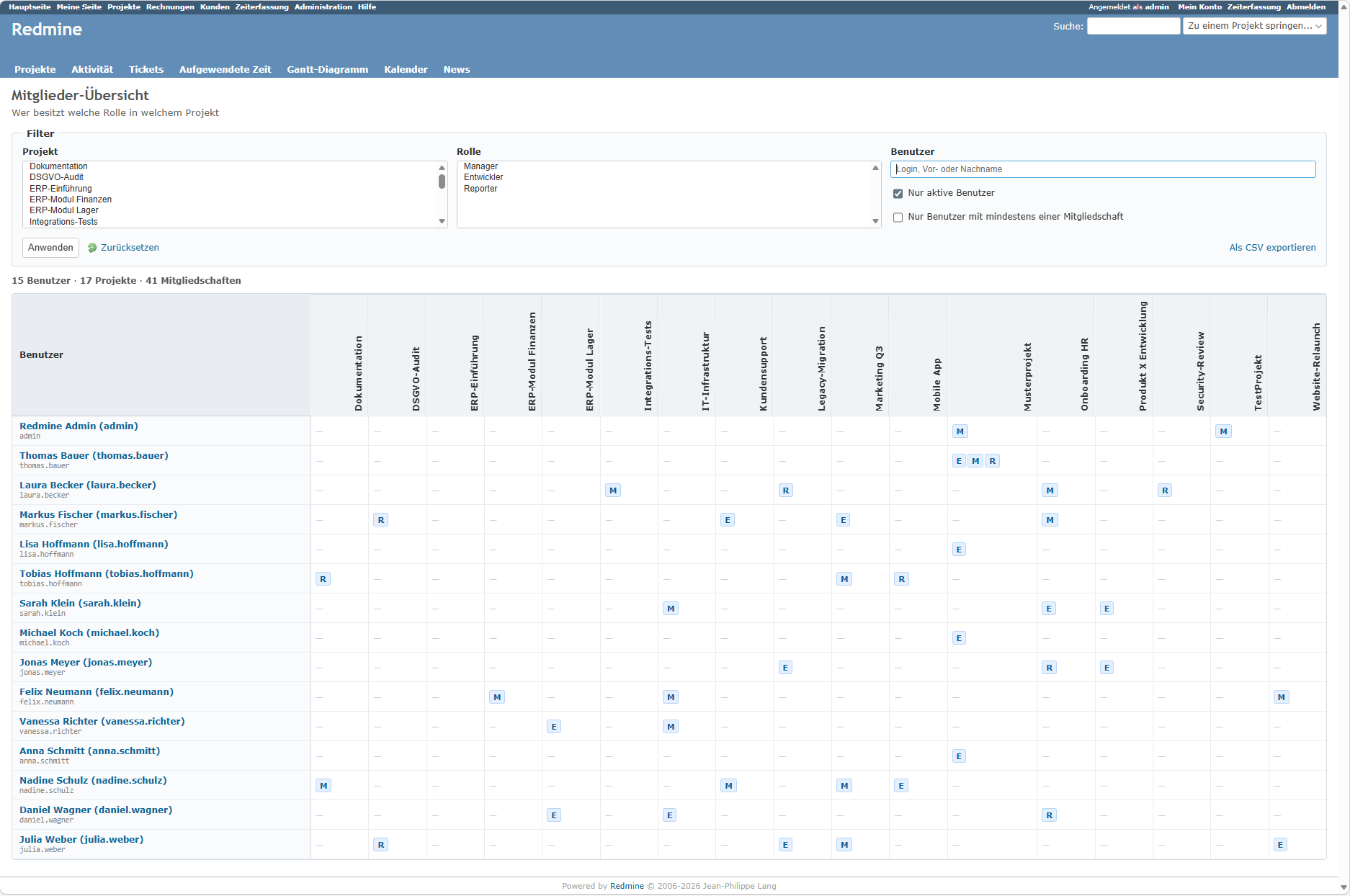
Administration → Member audit. By default, the matrix shows every active user as a row and every active project as a column. Large installations might find this unwieldy; use the filter panel to narrow the scope.
4.2 Reading the matrix
Each non-empty cell lists one or more small role badges:
- Blue badges = the user holds this role directly in the project.
- Amber badges = the user holds the role because they are in a group that is a member of the project.
- Violet badges = the role was inherited from a parent project (the project must be configured with Inherit members).
Hover any badge to see the full role name and the exact origin ("Direct in this project", "Via group X", "Inherited from project Y").
If a user holds the same role in a project through multiple origins, the stronger origin wins for display: direct > group > inherited.
4.3 Filters
- Project – restrict the columns to a selected set of projects.
- Role – show only users that hold at least one of the selected roles somewhere.
- User – substring match on login, first or last name.
- Only active users – default on; uncheck to include locked/registered users.
- Only users with at least one membership – hides rows that would otherwise be completely empty (useful when filtering by project and you want to see only who has some role there).
4.4 CSV export
The Export as CSV button downloads the currently filtered matrix as a flat CSV (login, firstname, lastname, email, project, project id, role, origin, via). One row per user-project-role combination. Use this for spreadsheet-based audits or archival.
5. Troubleshooting
Admin menu entry missing. Verify the plugin loaded (Administration → Plugins) and that the logged-in user actually has administrator rights. The page is require_admin; non-admins get a 403 even if they reach the URL.
Matrix is empty. The filter combination might be too restrictive. Click Reset to clear all filters and start from the default view.
User holds a role I expected but the badge is not shown. Check the origin: only active projects are shown by default. Also, inherited roles require the sub-project to have Inherit members enabled in the project settings; without that flag, parent memberships do not count.
CSV has more rows than the HTML table shows entries. The HTML matrix deduplicates a role when a user holds it through several origins (direct wins over group wins over inherited). The CSV keeps every origin separately, so audit trails remain complete.
6. Support
Support is included for twelve months from the date of purchase.
E-mail: support@atori.de Initial response: within 48 hours on business days.