Time Tracking

The weekly timesheet your team will actually fill in.

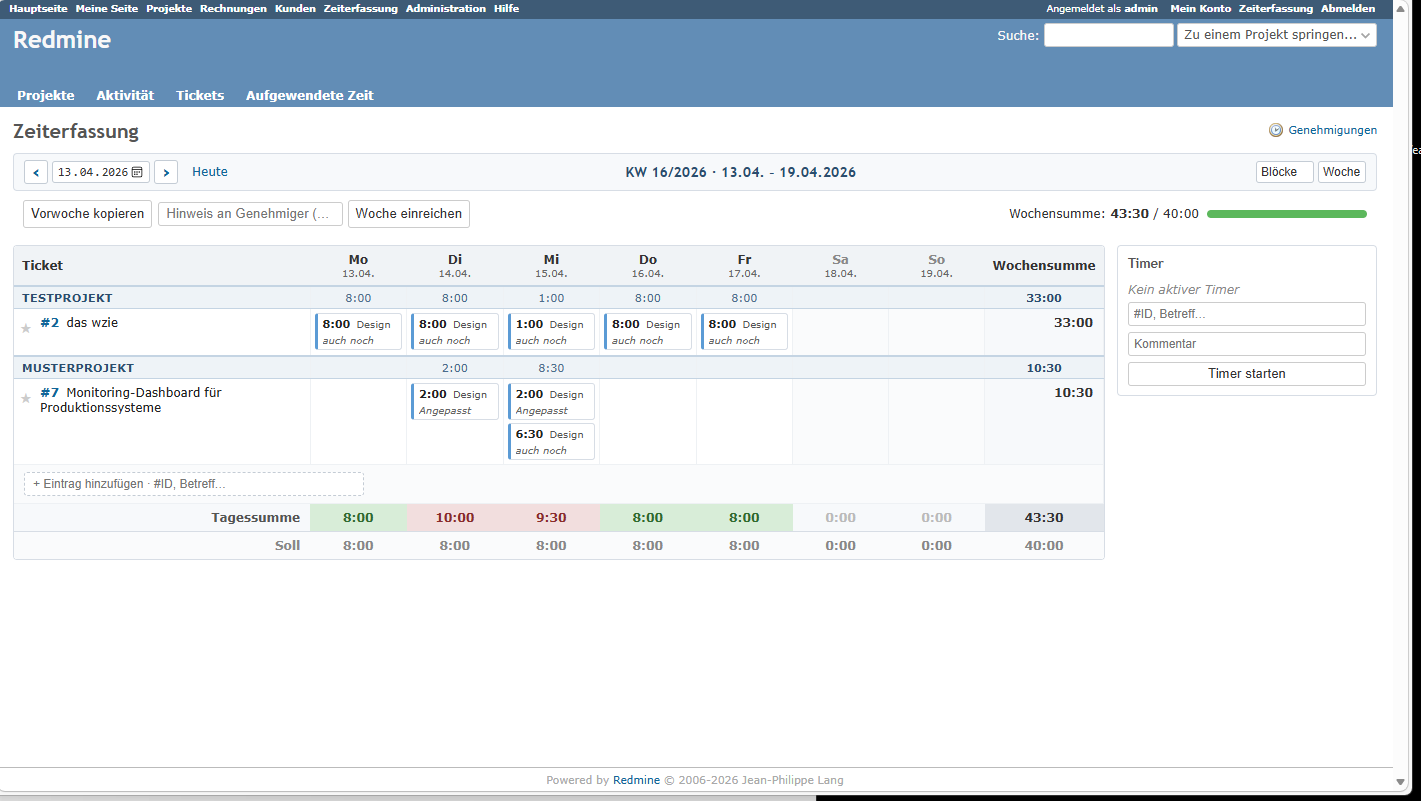
Weekly grid time tracking with timer, favourites, a monthly view and a lightweight approval workflow – fully integrated into Redmine.

New in 1.6 Export for contractor portals: an approved week becomes a file that MyTime by Hays imports directly – read more.
€249 one-time, net*

Per Redmine instance, unlimited users. 12 months of updates included.

Buy now

Read the manual

Weekly timesheet grid in the atori time-tracking plugin with timer and project grouping

New to Redmine?

What Redmine is – and why Time Tracking builds on it.

Redmine is a free, open-source project management tool – projects, issues, wiki, time entries – developed since 2006 and used by tens of thousands of companies. It runs on your own server, with no fee per user. Time Tracking is a plugin for it: you get tasks and hours in one place, not just a stopwatch.

A fit for teams that want projects and hours together. Not a fit for anyone who only wants a stopwatch without projects, or does not want to run a server.

New in version 1.6

Record your hours once – even when you bill through Hays.

Contractors placed through a staffing agency type their hours into the agency's portal a second time at month end. Version 1.6 removes that step: a submitted or approved period is exported as a file that MyTime by Hays imports as it is – no column mapping, no rework.

Verified against the live portal

Column names, date and hour formats were checked against MyTime's own import. MyTime reads the file exactly as written, right through to the client's approval.

Assigned per project

Which portal a project reports to is set in its settings. The export appears only there; every other project is untouched.

Approved time only

Only submitted or approved periods are exported, so the portal receives exactly what the team signed off.

More portals will follow as soon as their import has been verified. Manual, section 5.10

Features

Built for teams that actually document their time.

Weekly grid

Enter hours straight into the grid; an entry on the wrong day is fixed in seconds. No clicking through forms.

Timer

Start and stop on the current issue. The time lands in the weekly grid automatically – nothing gets lost.

Favourites & copy-week

Mark frequently booked issues as favourites and roll a whole week forward as the template for the next.

Monthly view

A monthly view alongside the weekly grid – for leave planning, year-at-a-glance and reporting.

Approval workflow

Staff submit their weeks, managers approve or reject them – and a period can be reopened later if needed.

Drag & drop between blocks

Move entries between days or issues without opening a dialog. Quick corrections, no friction.

Export for portals 1.6

Approved periods as a file for contractor portals – MyTime by Hays imports it without any column mapping.

Requirements

Runs on a standard Redmine 5 or 6.

Installation

cd /path/to/redmine
unzip at_zeiterfassung-1.7.0.zip -d plugins/
bundle exec rake redmine:plugins:migrate NAME=at_zeiterfassung RAILS_ENV=production
# restart Redmine

Give your roles the View own timesheet and Approve timesheets permissions, pick a default activity in the plugin settings – done.

Licence

GPLv2. Open source. Transparent.

Redmine itself is GPLv2 – every plugin that loads into Redmine at runtime must be as well. You get the full source, no activation servers and no hidden telemetry.

The price buys verified releases, twelve months of updates and direct support from the development team – not access to the code.

Entry in the Redmine plugin directory →